TL;DR
Solar backup power stations, often called portable power stations, store electricity in a battery and deliver it through outlets and USB ports. Choose by checking both energy capacity in watt-hours (how long it can run devices) and output power in watts (what it can run at once), then account for solar conditions, accessories, and safe installation.
A battery marked 1,000 Wh can still fail to start an appliance that draws too much power. That’s the first surprise many people meet when shopping for solar backup power stations: the biggest number on the box does not tell the whole story.

Get backup power and energy gear delivered free with Prime
- Fast, free delivery on millions of items
- Prime Video, Amazon Music and more included
- Member-only deals all year
These stations, often called portable power stations, store electricity in a battery and send it to devices through AC outlets, USB ports, or 12-volt connections. You can charge them from a wall outlet, solar panels, a vehicle, or, on some models, a generator.
This guide explains how capacity and output work, how to estimate runtime and solar charging, and what to check before you buy. You’ll also see where a portable battery fits during an outage—and where household wiring calls for compatible equipment and a licensed professional.
Compare both Wh capacity and W output: one estimates runtime, the other limits simultaneous demand.
Use a device list and hours of use to estimate energy needs, then account for conversion losses and startup surges.
Treat solar charging estimates as idealized; shade, clouds, panel angle, heat, and input limits reduce real-world power.
Compare battery cycle-life claims only after checking their capacity-retention threshold and test conditions.
Use a portable station for selected devices; household wiring and home integration need compatible equipment and professional installation.
Check both numbers before you pick a station
Solar backup power stations have two headline ratings to check: capacity in watt-hours (Wh) and output power in watts (W). Capacity tells you roughly how much energy the battery stores; output tells you how much electricity the station can deliver at one time. You need both numbers to know whether a unit fits your devices.
Think of capacity as the size of a water tank and output as the width of its tap. A large tank can hold plenty, but a narrow tap cannot fill a bucket quickly. In battery terms, a unit might store enough energy for several phone charges yet lack the continuous output—or brief startup surge—to start a refrigerator compressor.
For example, a laptop drawing 60 W for four hours uses about 240 Wh before losses. A station rated at 500 Wh has more stored energy than that estimate, but conversion losses and the laptop’s changing demand reduce the amount that reaches the device. Treat the calculation as a planning estimate, not a promise.
Check the continuous output rating for appliances you expect to use together, and the surge rating for motor-driven devices. A refrigerator may draw more power briefly when its compressor starts. If the station cannot handle that moment, extra battery capacity will not solve the problem.
Capacity helps set runtime; output sets the ceiling on what can run at once.
Products Worth Considering

Levoit Core 600S-P Smart Air Purifier for Large Rooms up to 2933 ft²

Dyson V9 Motorbar Cordless Vacuum

Sonos Era 100 Wireless Smart Speakers, 2-Pack, Black
As an affiliate, we earn on qualifying purchases.
Estimate how long your devices will run
A useful first estimate is runtime in hours ≈ usable battery capacity in Wh ÷ device consumption in W. This gives you a starting point for planning, but actual runtime will usually be lower because the station loses some energy during conversion and devices do not always draw power at a steady rate.
Imagine a 500 Wh station powering a 50 W laptop. The simple division suggests 10 hours. In practice, the station’s usable capacity, inverter losses, and the laptop’s charging behavior can shorten that time. A screen set to full brightness and a video call will also use more energy than a laptop sitting idle with its lid closed.
Refrigerators need a different approach. Their compressors cycle on and off, so the running wattage printed on a label does not tell you their full-day energy use. If you can find the refrigerator’s daily kilowatt-hour use, convert it to Wh and compare it with the station’s usable capacity. A warm kitchen, frequent door opening, or a weak seal can raise consumption.
To build a practical estimate, list the devices you plan to power, how many hours you’ll use each, and whether they’ll run together. Add their energy needs for the day, then check that the highest simultaneous demand stays below the station’s continuous output. Leave a margin for changing conditions; a power plan that only works on paper can leave your phone dark at midnight.
Use this checklist to match a station to your needs
Choose a solar backup station by matching its stored energy and output to the devices you actually need. Start with essential loads—perhaps a phone, laptop, router, lights, and a medical device—rather than guessing from a broad label like “home backup.” A clear list gives you a better basis for comparing models.
- Write down each device and its wattage or daily energy use. For a refrigerator, look for energy use over time as well as compressor power.
- Estimate how long you need each device to run. A router needed for a workday has a different energy budget from one needed for a short outage.
- Add devices that run at the same time and compare their total draw with the station’s continuous output.
- Check surge capacity for compressors, pumps, and other motor-driven loads that may briefly draw more power at startup.
- Review ports, weight, and charging options, including whether the unit supports the connectors you need and can power devices while charging.
Picture a family working through a six-hour outage: one parent needs a laptop and router for work, while the household also wants a few LED lamps and phone charging. Listing those needs makes it easier to compare a station with enough ports and output against one that has a larger battery but awkward connections. Solar panels, cables, adapters, and extra batteries can add to the advertised price, so compare the cost of the full setup.
Weight matters too. A heavy unit may suit a home backup shelf but feel cumbersome on a camping trip. Check usable capacity, output, ports, solar input, warranty, and temperature limits together, rather than choosing on battery size alone.
Plan for slower solar charging than the label suggests
Solar charging time depends on the battery size, panel wattage, sunlight, and the station’s maximum solar-input rating. A rough ideal estimate is battery capacity in Wh ÷ panel power in W, but that calculation assumes the panel produces its rated power throughout the session. Outdoor conditions rarely cooperate that neatly.
For example, a 500 Wh battery paired with a 200 W panel has an idealized charging time of two and a half hours. Clouds, shade from a tree, a panel aimed away from the sun, and heat can all lower the actual input. The station may also cap incoming power below the panel’s rating, so check the supported solar-input range and connector before buying.
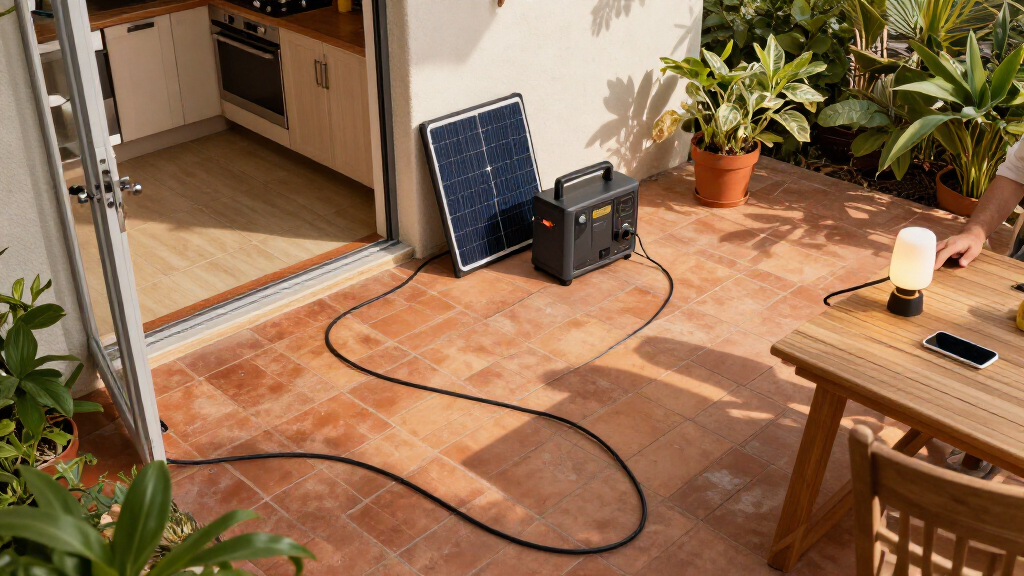
Portable panels can be useful at a campsite or during a sunny afternoon outage. You might place one outside to recharge the station while keeping the battery indoors within its specified temperature and moisture limits. Panel weather resistance varies, so check the panel’s rating and instructions before leaving it out in rain or wind.
Some models let you charge and use the station at the same time, but the feature and its limits vary. Read the manual before relying on this arrangement, especially when using solar input. For steady backup, consider whether the panel can be safely positioned and whether you have a fallback charging source if overcast weather lasts all day.
Choose battery chemistry for how you’ll use it
Battery chemistry affects a station’s weight, size, service life, and performance. Many newer models use lithium iron phosphate (LFP), valued for thermal stability and long cycle life; some lithium-ion designs may be lighter or more compact. Neither label alone tells you which unit suits your routine, so compare the specific product details.
Suppose you keep a station in a home emergency kit and only use it during occasional outages. Portability may matter less than a clear warranty, safe storage guidance, and enough capacity for essential devices. If you carry it to a campsite, a lighter unit might be worth considering, provided its output still covers your needs.
Cycle-life claims need careful reading. One manufacturer might state how many cycles a battery can complete before reaching a particular capacity-retention level, while another may use a different threshold or test condition. Those figures cannot be compared fairly unless you know what each one means. Check the manual and warranty for storage temperature, charging practices, and the manufacturer’s definition.
Recent models also offer modular batteries, faster AC charging, higher-power USB-C ports, app monitoring, or automatic backup features when paired with suitable equipment. These options can be handy if you want to expand a system over time. They also add cost and complexity, so ask whether you will use the feature: a glossy phone app will not make a station more useful if the ports cannot power your essentials.
Keep portable backup separate from household wiring
A portable station can run selected devices, but it does not automatically become a whole-home backup system. Larger setups may support more loads, yet household backup depends on capacity, output, transfer equipment, wiring, and proper installation. Connecting a station to household wiring requires compatible equipment and a licensed professional.
For a small outage, you might plug a lamp, phone charger, or router directly into the station’s outlets and keep the unit in a dry, ventilated place within its operating limits. That direct connection differs from feeding power into home wiring. A transfer device and correctly designed setup protect people and equipment; improvised connections can create dangerous backfeed.
Think about a winter storm that knocks out power overnight. A portable station may keep communications and a few lights going, but an electric heater or air conditioner can draw substantial power and drain the battery quickly. Check both the appliance’s running demand and startup surge, then compare those figures with the station’s ratings. If heat or cooling is part of your backup plan, a small portable battery may not meet the need.
Never run a fuel-powered generator indoors. It produces exhaust. Follow manufacturer guidance for battery charging and ventilation, and use qualified help for electrical connections or home integration.
Frequently Asked Questions
What can a solar power station run?
It can run devices whose combined demand stays within its continuous output, with enough stored energy for the time you need them. Check startup surges for refrigerators, pumps, and other motor-driven appliances. A phone and router are very different loads from an electric heater.
How long will a station run a refrigerator?
Runtime depends on the refrigerator’s energy use over time, the station’s usable capacity, and conversion losses. Because compressors cycle on and off, daily energy use is more useful than the compressor’s running wattage alone. Frequent door opening and a warm room can raise consumption.
How long does solar charging take?
As a rough ideal estimate, divide battery capacity in Wh by panel power in W. A 500 Wh battery with a 200 W panel gives an ideal estimate of two and a half hours, but clouds, shade, panel angle, temperature, and the station’s input limit can extend that time.
Can a portable power station run a whole house?
Small portable stations usually suit selected devices, not every household load. Whole-home backup depends on capacity, output, transfer equipment, and wiring. Have a licensed professional handle connections to household wiring and confirm that the equipment is compatible.
Can I use a station while it is charging?
Many models allow simultaneous charging and use, but capability and limits differ. Check the manual for the exact model, especially when using solar input, and follow its temperature, ventilation, and charging instructions.
Is a solar battery station better than a gas generator?
A battery station runs quietly and can recharge from solar, but its stored energy is limited. A fuel generator can run longer with fuel, but it creates exhaust and noise and needs fuel handling and maintenance. Some households use both for different needs; never operate a fuel-powered generator indoors.
Conclusion
Before you buy, write down the devices you need, their energy use, and how long they must run. Then match both the Wh capacity and W output, and price the panels and accessories you’ll actually need.
A backup station earns its space when the lights go out and your essentials keep working. Choose for the evening you need to get through, not the biggest number on the box.