
TL;DR

Get backup power and energy gear delivered free with Prime
- Fast, free delivery on millions of items
- Prime Video, Amazon Music and more included
- Member-only deals all year
A report by Bosscher describes using a $10 OpenStick as a quiet, low-power Debian homelab, running services for DNS filtering, monitoring, RSS, bookmarks and more. The account gives memory figures for several applications, but does not provide independent performance testing or a full breakdown of the device’s operating costs.
Bosscher says a $10 OpenStick is running a small Debian homelab that hosts services for DNS filtering, server monitoring, RSS reading, bookmarks and AI-assisted administration. The account describes a low-cost way to experiment with self-hosting on hardware with 512 MB of RAM, though the reported setup and performance are the author’s own experience, not an independent test.
The OpenStick has four 1 GHz ARM Cortex-A53 cores, 4 GB of eMMC storage, Wi-Fi and a 4G modem with GPS, according to Bosscher. The author estimates that about 450 MB of RAM is usable. It is passively cooled, which Bosscher says makes the device silent, and the reported purchase price included shipping. The account does not specify when or where it was bought.
Bosscher says the installation process takes some effort, after which the device runs Debian, including systemd for managing services and Podman for containers. Applications include AdGuard Home for DNS-based blocking, Cloudflare Tunnel to make services reachable without opening ports, and Beszel for resource graphs and alerts. The author reports that AdGuard Home blocked about 60% of DNS queries after adding blocklists; that figure is specific to this setup, and the author says many blocked requests appeared harmless.
Other services described include Zeroclaw, an AI agent used through Telegram to check the server and its logs; Dozzle for viewing Podman logs; Gatus for service-availability checks; Fusion for RSS feeds; and Shiori for bookmarks and website archiving. Bosscher lists approximate memory use for several applications, including 3 MB of idle resident memory for Zeroclaw, 20 MB for Beszel’s agent and server combined, 22 MB for Fusion and 10–20 MB for Shiori. The figures are the author’s estimates and do not amount to a complete memory or power-use benchmark.
Small Hardware, Useful Services
The account illustrates how lightweight services can fit within tight memory limits, making inexpensive hardware a possible starting point for people learning Linux administration and self-hosting. A small device can handle several personal tools without the noise or apparent complexity of a larger server, according to the author.
There are trade-offs. The OpenStick’s 512 MB of RAM and 4 GB of storage constrain what it can run, and an inexpensive device does not by itself make hosted services secure or reliable. Bosscher notes that DNS filtering cannot block every unwanted connection and that Cloudflare Tunnel routes access through a third-party service. The setup is best understood as one hobbyist’s practical configuration, not a general guarantee of privacy, uptime or suitability for every service.
Products Worth Considering

LG S90TR 7.1.3‑Channel OLED Evo TV Matching Home Theater Soundbar (Black)

Roborock Q7 M5+ Robot Vacuum and Mop with Self-Emptying Dock
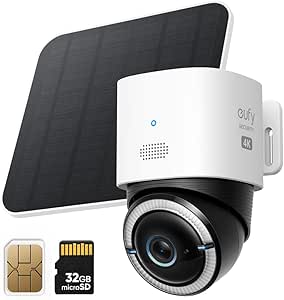
eufy Security 4G LTE Cam S330 4K Solar Outdoor Camera with Pan and Tilt, AI Tracking, SIM Card and 32GB SD Card
As an affiliate, we earn on qualifying purchases.
From Novelty Gadget to Server
Bosscher says the OpenStick was bought on a whim because it seemed like an interesting piece of hardware. Its small memory and storage capacity make it substantially different from a conventional home server, but the author argues that Debian and small-footprint applications make it useful for experimentation. The account presents software selection as part of the solution: several tools are chosen specifically because they use relatively little memory.
The author contrasts Zeroclaw with a previous experience running OpenClaw on a Kubernetes cluster. Bosscher says that setup used more than 1 GB of memory and was frustrating to maintain, while Zeroclaw idles at about 3 MB in the author’s setup. Those are personal comparisons and do not establish how the projects perform across different configurations. Bosscher says Zeroclaw’s documentation and active community influenced the choice over alternatives, and mentions contributing a change for richer Telegram messages.
“For 10 dollars you basically get a home server with minimal power usage and zero noise!”
— Bosscher, author of the report
Limits of the Reported Setup
The report does not give the device’s exact model, purchase date, total electricity use, measured uptime, network conditions or a full account of installation steps. It also does not provide independent tests of the listed memory figures, service reliability or security. The 60% blocked-query figure lacks a stated measurement period and comparison baseline, so it should be treated only as the author’s observation.
Security risks also depend on configuration. Bosscher says Zeroclaw has access to the OpenStick and describes that access as effectively a root shell, while limiting its reach to the device. The report does not detail all permissions or safeguards. It also does not establish how Cloudflare handles the traffic in this configuration; the author’s comment about possible access by intelligence agencies is presented as a concern, not a verified finding.
Further Changes to the Setup
Bosscher says a contribution intended to add richer Telegram message support to Zeroclaw is being tracked for a future version; the report does not give a release date or say whether it has been merged. The author also says Dozzle and Beszel overlap in some functions and may remove one if saving another 10–20 MB becomes necessary. No broader rollout or formal performance test is announced. The next developments described are therefore software updates and possible adjustments to this personal setup.
Key Questions
What is an OpenStick in this report?
It is a small computer Bosscher bought for $10 including shipping. The reported specifications include 512 MB of RAM, four 1 GHz ARM Cortex-A53 cores and 4 GB of eMMC storage.
What services does the homelab run?
The author lists tools for DNS filtering, remote access, monitoring, container logs, RSS feeds and bookmarks, along with Zeroclaw, an AI agent used through Telegram to check the server.
Does AdGuard Home block 60% of all internet traffic?
No. Bosscher reports that it blocked about 60% of DNS queries in this particular setup after blocklists were added. The report gives no measurement period or baseline, and DNS filtering does not block every unwanted connection.
Is the setup independently tested?
No independent testing is included in the source material. Memory figures, usability observations and the reported query-blocking rate are the author’s estimates or experience.
What is the main limitation of the device?
Its limited memory and 4 GB of storage restrict which services and workloads it can handle. The report also does not quantify power use, uptime or the security of the complete configuration.
Source: blog.bosscher.ch