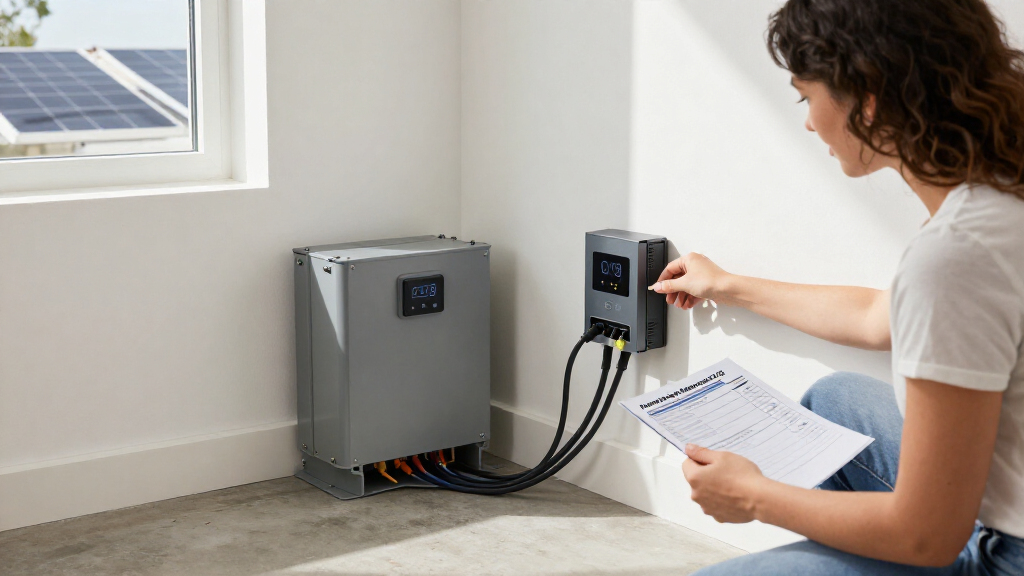

This checklist is for homeowners maintaining a home battery backup system and anyone who wants a clear routine for inspecting its connections and related equipment. Follow the battery and inverter manufacturers’ instructions first, and use this guide to identify what to inspect, what to keep compatible, and when a product title may not match the task. System compatibility matters at every step.

Get backup power and energy gear delivered free with Prime
- Fast, free delivery on millions of items
- Prime Video, Amazon Music and more included
- Member-only deals all year
The checklist is organized by maintenance slot: monitoring, terminal protection, cleaning, cable lugs, disconnecting, and insulation. Some slots have a named pick; others provide advice only. The picks are presented by their supplied product names, so confirm the item’s actual specifications and intended use before relying on it for a home energy system. Verify the details against your battery setup.
Use the sections as a sequence of prompts, not as a substitute for your equipment manuals or safe-work procedures. Before inspecting or cleaning, follow the manufacturer’s shutdown and isolation directions; do not work on energized connections. If you are unsure how to isolate the system or assess a damaged connection, ask a qualified installer. Safe isolation comes first, followed by checking fit and condition.
Battery Monitor
A monitor can help you keep track of the battery system, making it easier to notice when readings or behavior deserve attention. The listed pick is the LiTime 500A Bluetooth Battery Monitor for 8V-120V Systems. Its title gives a voltage range and a current rating, but those details alone do not establish that it works with a particular battery bank, inverter, shunt arrangement, or monitoring setup. Check the manufacturer’s full specifications and installation instructions before selecting it.
A common mistake is treating a broad voltage range as proof of system compatibility. Confirm the battery bank’s nominal voltage, the monitor’s supported chemistry and configuration, whether a shunt is included or required, and how the monitor connects to the batteries and loads. Check that the current rating suits the system’s expected charge and discharge current, including inverter demands. Also confirm the app or display requirements and whether the device can be installed in the location you have available. Match every connection and rating to your system documentation.
During maintenance, compare readings over time and use the battery maker’s guidance to interpret them. A monitor is an aid to observation; it does not replace inspection of wiring, terminals, or protective equipment. If readings seem inconsistent, verify installation and settings before drawing conclusions. Use trends as prompts for a closer check.
What to look for:
- Confirm nominal bank voltage falls within the monitor’s supported range.
- Check current rating against expected system charge and discharge current.
- Verify chemistry, shunt, and wiring compatibility in the full specifications.
- Confirm app, display, and connection requirements fit your setup.
- Follow the battery and monitor makers’ installation and isolation instructions.
LiTime 500A Bluetooth Battery Monitor for 8V-120V Systems

The LiTime 500A Bluetooth Battery Monitor allows real-time tracking of battery parameters via a mobile app, supporting various battery types and voltages. It offers customizable alerts, historical data analysis, and reliable protection features for RV, marine, and backup systems.
Pros:
- Real-time monitoring via mobile app
- Supports multiple battery types and voltages
- Customizable alerts for early issue detection
- Provides historical data for performance analysis
Cons:
- Requires smartphone app for full functionality
- Limited to 1-year warranty
Best for: Homeowners whose system matches the monitor’s verified specifications
Not ideal for: Setups whose voltage, current, or monitoring requirements are unconfirmed
Bottom line: Confirm the complete specifications and system fit before installing this monitor.
Battery Terminal Protectors
Terminal covers help keep exposed battery terminals insulated from accidental contact when the covers are designed for the battery and connection in use. The listed pick is 8 Pieces Battery Terminal Covers – Insulating Protector for Car and Bo. The supplied title is truncated and refers to car and “Bo,” so it does not clearly identify the full intended application or the dimensions and materials. Confirm those details with the seller or manufacturer before considering the covers for stationary home storage.
A frequent buying mistake is choosing covers by piece count or appearance without checking terminal shape and size. Compare the positive and negative terminal layout, post or stud dimensions, cable lug size, and the clearance available around each connection. Check whether the cover can be fitted without stressing the cable or interfering with the battery enclosure, ventilation, service access, or nearby components. Fit must be confirmed at the terminal, not inferred from a broad product title.
Use only covers that are specified for the battery application and compatible with its materials and environment. During routine checks, look for a cover that has shifted, cracked, or become contaminated, and follow the manufacturer’s instructions for safe access to the terminals. Covers do not correct loose, corroded, or incorrectly sized connections. Inspect the connection beneath whenever maintenance requires removing a cover.
What to look for:
- Ask for the complete product title and intended application.
- Measure terminal posts or studs and compare with the cover dimensions.
- Check compatibility with cable lugs and positive/negative terminal layout.
- Confirm material suitability for the battery environment and enclosure.
- Ensure covers preserve access and do not stress cables or block required clearances.
8 Pieces Battery Terminal Covers – Insulating Protector for Car and Boat Batteri
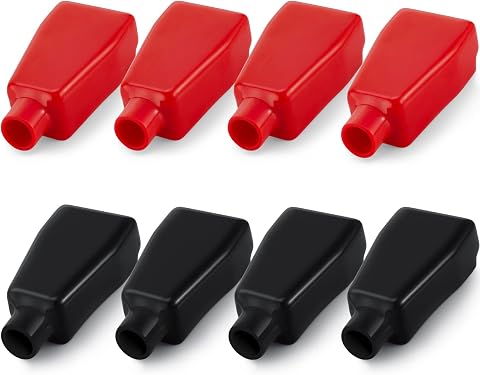
This set includes 8 PVC plastic battery terminal covers in red and black, designed to protect battery terminals from short circuits, corrosion, and dust. Suitable for automotive, marine, and household electrical applications, these covers offer reliable insulation and long-lasting protection.
Pros:
- Provides effective insulation and protection for battery terminals
- Includes multiple covers for both positive and negative terminals
- Flexible and durable material suitable for various applications
Cons:
- May not fit all battery terminal sizes
- Requires careful size confirmation before use
Best for: Installations with terminal dimensions and application compatibility confirmed
Not ideal for: Battery banks where the truncated listing leaves fit uncertain
Bottom line: Verify the full listing and terminal measurements before using these covers.
Battery Cleaning Brush
Battery cleaning should be limited to the maintenance method permitted by the battery maker. The supplied pick is Battery-Powered Ride-On Commercial Floor Scrubber with 22″ Brush and 3″, which describes a ride-on floor-cleaning machine rather than a battery-terminal brush. Its title does not establish that it is suitable for battery maintenance. Do not assume a floor scrubber can clean battery terminals or enclosures safely.
A common mistake is selecting a tool based on the word “battery” in its title. That word may refer to the machine’s power source, not the surface it is designed to clean. For battery work, check the battery manufacturer’s cleaning instructions and use only tools and materials specified for the task. Consider whether a tool could abrade terminals, spread residue, introduce moisture, or contact energized components. Choose for the surface and task, not a keyword in the product name.
Before any cleaning, isolate the equipment as directed by its manufacturer and use the required protective measures. Do not apply liquids or abrasives unless the manual permits them. If a battery shows leakage, damage, unusual residue, or corrosion you cannot address using the manual’s procedure, stop and contact a qualified service provider. For the listed machine, verify its intended use independently; the provided title does not support recommending it for battery cleaning. Follow the battery maker’s procedure for the correct tool and method.
What to look for:
- Confirm the tool is explicitly intended for the battery surface and task.
- Follow the battery maker’s approved cleaning method and materials.
- Avoid tools that can abrade terminals or contact energized parts.
- Check whether moisture or residue could reach electrical connections.
- Stop and seek qualified service for leakage, damage, or unfamiliar deposits.
Battery-Powered Ride-On Commercial Floor Scrubber with 22" Brush and 31.5" Squee

This ride‑on floor scrubber provides a wide 22‑inch brush and 31.5‑inch squeegee for fast, efficient cleaning of large commercial spaces. It features dual tanks (≈19 gal solution, ≈20 gal recovery), up to 48,400 sq ft per hour coverage, and operates quietly at 60 dB.
Pros:
- Wide cleaning and squeegee widths cover large areas quickly.
- High coverage rate of 48,400 sq ft per hour improves productivity.
- Large dual‑tank capacity reduces refill frequency.
- Quiet operation (60 dB) suitable for noise‑sensitive environments.
Cons:
- Runtime limited to 3–4 hours may require frequent recharging on very large jobs.
- Charge time of 7–8 hours could delay back‑to‑back shifts.
Best for: Commercial floor-cleaning tasks described by its verified specifications
Not ideal for: Cleaning battery terminals or enclosures without explicit manufacturer approval
Bottom line: The supplied title describes a floor scrubber, so use the battery maker’s specified cleaning method.
Battery Cable Lugs
Cable lugs create the connection between a cable and a battery terminal or bus connection, so a mismatch can compromise fit and maintenance access. No product is specified for this slot. Choose lugs only after identifying the battery terminal or stud type, the cable conductor material, and the cable size. Start with the actual connection dimensions rather than a generic lug assortment.
Common mistakes include mixing incompatible metals, choosing a lug that does not match the conductor, and assuming that a physically fitting ring or barrel is electrically appropriate. Check the battery and inverter documentation for approved conductor and termination details. Confirm the lug’s stud-hole size, barrel dimensions, and material, as well as the crimping tool and die required by its manufacturer. The finished connection needs suitable clearance and strain relief without placing force on the terminal. Match lug, cable, tool, and terminal as a set.
For home battery systems, follow the specified cable preparation, crimping, torque, and inspection procedures. Do not improvise a termination or reuse damaged lugs. If documentation is incomplete or the correct crimp equipment is unavailable, have a qualified installer select and fit the connection. Check completed connections only using the manufacturer’s safe maintenance procedure. Use documented termination steps for a secure, serviceable installation.
What to look for:
- Match lug barrel size to the cable conductor and insulation arrangement.
- Confirm stud-hole size and terminal type from equipment documentation.
- Check lug material compatibility with cable and battery connection materials.
- Use the specified crimp tool and die for the lug model.
- Follow documented preparation, torque, and inspection procedures.
Battery Disconnect Switch
A disconnect switch provides a way to isolate a battery circuit when the equipment and installation are designed for it. The listed pick is the Flaming River FR1003 Battery Disconnect Big Switch. The product name alone does not state its voltage, current, interruption, or continuous-duty ratings, nor whether it is intended for a stationary home battery system. Check the manufacturer’s documentation and applicable system requirements before considering it.
A common mistake is assuming that any switch labeled “battery disconnect” is appropriate for an inverter-backed battery bank. Compare the system’s nominal and maximum voltage, continuous current, and possible fault current with the switch’s specified ratings. Confirm whether it is rated for the current type and intended duty, how it must be mounted, and whether it can be integrated with the system’s existing overcurrent protection and controls. Check DC ratings and duty against the actual circuit, not just the product name.
Installation and operation should follow the battery, inverter, and switch instructions, including required cable sizing, fuse placement, and access. A disconnect switch does not replace correctly rated overcurrent protection or the shutdown procedure required by the equipment. If the ratings or circuit design are unclear, have a qualified installer assess the fit before purchase or installation. Use the system’s isolation plan whenever maintenance is needed.
What to look for:
- Verify voltage and continuous-current ratings for the specific circuit.
- Confirm suitability for the system’s current type and duty.
- Check fault-current and integration requirements in the equipment documentation.
- Confirm mounting, cable, and access requirements for the installation.
- Have a qualified installer resolve rating or circuit-design uncertainty.
Flaming River FR1003 Battery Disconnect Big Switch

The Flaming River FR1003 is a large battery disconnect switch designed for automotive applications. It provides a reliable way to disconnect the battery for safety and maintenance.
Pros:
- Durable and reliable battery disconnect switch
- Easy to install and operate
- Compact packaging suitable for various applications
Cons:
- Limited detailed specifications provided
- No customer reviews or ratings available
Best for: Systems whose documented electrical requirements match the switch
Not ideal for: Installations without confirmed DC and current ratings
Bottom line: Confirm the switch’s full ratings and intended use before fitting it to a home battery circuit.
Battery Insulation Blanket
No product is specified for this slot. Battery insulation is a system-specific choice: battery chemistry, manufacturer instructions, operating environment, enclosure, and ventilation all matter. Start by checking whether the battery maker permits insulation or requires a particular temperature-control approach. Follow the battery manufacturer’s guidance before adding any wrap or blanket.
A common mistake is treating insulation as a universal improvement. An added layer can affect heat dissipation, access to terminals, enclosure clearances, or the behavior of built-in temperature controls. Check the battery’s specified operating and storage conditions, and confirm how the enclosure is intended to manage heat and airflow. If the system uses a heated battery or temperature-dependent charging controls, verify that an added blanket will not interfere with those features. Preserve designed airflow and access unless the manufacturer directs otherwise.
If insulation is approved, choose a material and configuration specifically compatible with the battery and its installation environment. Confirm that the arrangement does not cover required vents, labels, service points, or electrical protection. Do not use a blanket to compensate for an unsuitable location or to operate a battery outside its specified conditions. When the documentation does not clearly address insulation, ask the manufacturer or a qualified installer before making changes. Keep temperature management within specification and make the installation easy to inspect.
What to look for:
- Check whether the battery maker permits insulation or specifies a thermal solution.
- Review operating and storage temperature limits for the battery.
- Preserve required ventilation, clearances, labels, and service access.
- Confirm compatibility with built-in heating and temperature controls.
- Ask the manufacturer or installer when guidance is unclear.
Work through purchases in the order that supports safe inspection: first confirm monitoring and isolation requirements from the system documentation, then verify terminal-cover fit and any cable-lug details, and consider cleaning tools or insulation only when the battery maker specifies what is suitable. Compatibility and safe access should guide each choice.
Keep a record of readings, inspection dates, and any service needs, and use the equipment manuals as your reference for maintenance intervals and procedures. When a product title leaves an important specification unclear, confirm it before buying or installing. A careful checklist makes routine upkeep easier to plan and helps you know when to bring in a qualified installer. Take it one check at a time and keep the system documentation close.
Fall Picks

eufy Security Essential 7-Piece Alarm System
As an affiliate, we earn on qualifying purchases.