
TL;DR
A solar backup power station stores electricity in a rechargeable battery and supplies it through an inverter, so you can power selected devices during an outage or away from the grid. Match the inverter’s watts to the devices running at once, estimate battery runtime in watt-hours, and check that your panels fit the station’s solar input limits. A portable station can keep essentials running, but home circuits need compatible transfer equipment and qualified installation.
A refrigerator can need a sharp burst of power just as your phone, router, and a lamp are already plugged in. That is why a battery marked with a big capacity number can still disappoint if its inverter cannot handle the appliances you need at the same time.

Get backup power and energy gear delivered free with Prime
- Fast, free delivery on millions of items
- Prime Video, Amazon Music and more included
- Member-only deals all year
Solar backup power stations combine a rechargeable battery, an inverter, charging inputs, and outlets in one system. You can use one for selected essentials during a blackout, at a campsite, or on a worksite. This guide explains what the numbers mean, how to estimate runtime, and how to check panel compatibility before you buy.
You’ll also see where a portable station’s limits begin. A useful backup plan depends on your actual devices, the length of the outage, and the sunlight available to recharge the battery—not just a product’s headline capacity.
Check inverter watts for simultaneous loads and startup surges; battery watt-hours estimate stored energy and runtime.
Estimate runtime with usable watt-hours divided by device watts, then allow for conversion losses and changing demand.
Confirm solar voltage, current, wattage limits, and connectors before connecting panels; ideal panel ratings do not predict everyday output.
Use portable stations through their own outlets; home circuit connections require compatible transfer equipment and qualified installation.
Compare model-specific temperature limits, charging behavior, cycle-life claims, and warranty terms before buying.
What a Solar Backup Power Station Can Do During an Outage
A solar backup power station is a rechargeable battery system that stores electricity and supplies it through household-style outlets or other ports. Its battery holds energy, its inverter changes direct current into alternating current, and its charging inputs let you refill it from a wall outlet, vehicle outlet, or compatible solar panels. These parts set different limits: the battery determines how much energy is available, the inverter limits the power delivered at any moment, and the charging input affects how quickly you can replenish what you use.
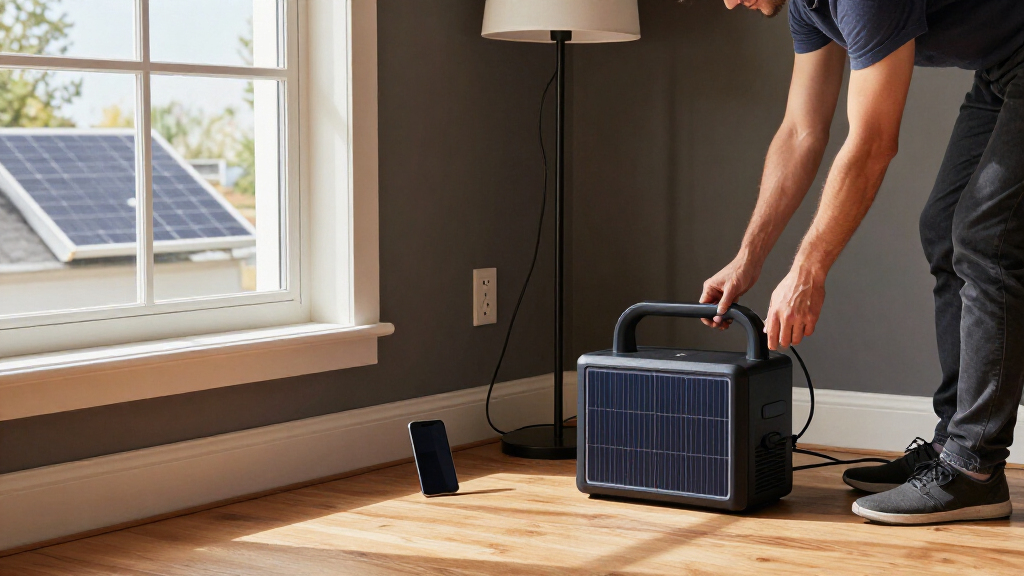
That setup can keep a phone, LED lamp, router, or small medical device powered without producing exhaust at the point of use. Imagine a summer storm knocks out power at 9 p.m.: a charged unit might keep your Wi-Fi router glowing and a lamp on the kitchen counter while you wait for utility service to return. What it can run depends on its capacity, its output rating, and how much energy each device uses. A low-watt device may run for many hours, while a high-watt appliance can drain the same battery quickly. If several devices start or run together, their combined demand also has to stay within the inverter’s limit.
A portable power station is usually a self-contained unit with handles or a compact case. A home battery system is typically larger, installed permanently, and connected to home equipment. Product labels can blur the line, so check whether a model powers devices through its own outlets or supports a properly installed connection to home circuits. The distinction matters because plugging a device directly into a station is a different electrical setup from energizing house wiring, which needs compatible equipment and professional installation.
These stations do not generate power by themselves. Without a wall, vehicle, or solar recharge, the battery eventually runs out. Solar panels can extend use, but only if their output and the available sunlight are enough to replace the energy your devices consume. A station is therefore best treated as a quiet way to support selected loads, with a plan for both the battery’s finite supply and the conditions needed to recharge it—not as an automatic replacement for a fuel generator or a whole-home battery system.
Products Worth Considering

TCL 55-Inch T7 Series 4K QLED Smart Google TV, 55T7

Levoit Core 400S-P Smart Air Purifier for Large Rooms

Levoit EverestAir-P Smart Air Purifier for Large Rooms
As an affiliate, we earn on qualifying purchases.
How to Size the Battery and Inverter for Your Devices
Size a station by matching its inverter output in watts to the largest load you will run at once, then match its battery capacity in watt-hours to the hours you need. Those figures answer different questions: output limits how much power the unit can deliver at one moment, while capacity estimates how much stored energy it has to deliver over time. That distinction helps explain common mismatches: a large battery can still trip or reject a load that exceeds the inverter rating, while a powerful inverter paired with a small battery can run a demanding device only briefly.
Start with device labels or manufacturer specifications. Add the running watts for appliances you expect to use together, then check whether any device needs extra startup power. A refrigerator may draw modest power once running but require a larger brief surge when its compressor starts. If that surge exceeds the inverter’s rating, the station may refuse the load even when the battery is nearly full. Leave some headroom if several motors or appliances could start together; operating close to the limit gives you less flexibility when a device cycles on or draws more than its usual amount.
To estimate runtime, use battery watt-hours × usable fraction ÷ device watts. For example, if you assume a 1,000 Wh battery has 85% usable energy and a router uses 20 W, the simple estimate is 850 ÷ 20, or about 42.5 hours. Actual runtime will be shorter because conversion losses, standby use, and changing device demand all consume energy. The usable fraction matters because the entire labeled capacity may not be available at the outlets, and leaving a reserve can be sensible when you need the station to last through an uncertain outage. Treat the result as a planning estimate, not a guaranteed runtime.
A small household list makes sizing easier:
- Phone: check the charger’s wattage and how many charging sessions you need.
- Router: look up its power draw and multiply by the hours it must stay online.
- Refrigerator: account for startup surge and cycling, not just a single running-watt figure.
- Medical device: follow the device maker’s power guidance and plan for a reliable backup duration.
If you need to run a router and a lamp all night, estimate those loads first. Buying by battery capacity alone can leave you with plenty of stored energy but too little inverter power—or a powerful inverter that empties a small battery quickly. Writing down the devices and hours also reveals useful tradeoffs: you may be able to extend runtime by switching off nonessential loads, or avoid buying a heavier, more expensive battery than your plan requires.
How to Check Solar Panel Compatibility Before You Buy
Solar panels will charge a station only when their electrical ratings fall within its supported solar-input voltage and current range. Check the station’s maximum solar charging wattage, voltage limits, current limits, and connector type in the manual or specifications. Voltage and current limits determine whether the station can accept the panel’s output safely; the wattage limit determines how much of that output it can use. A plug that fits is not proof that the panel is electrically compatible.
Suppose you already own a folding panel from a camping kit. Before connecting it, compare its open-circuit voltage and current with the station’s input limits, and confirm the connector or approved adapter. If the panel exceeds the stated voltage range, a matching-looking connector does not make the setup safe. When the figures are unclear, ask the manufacturer before connecting the equipment. Also check how the station handles panels wired in series or parallel: combining panels changes voltage or current, so a combination that fits each panel individually can exceed an input limit.
Panel wattage is measured under ideal conditions, so real charging varies. Shade from a chimney, a cloudy afternoon, a poor panel angle, cold or hot temperatures, and the season all affect output. A panel labeled 200 W does not promise that the station will receive 200 W throughout the day. Think of the rating as a best-case figure, not a daily energy guarantee. This matters during an outage: if the panel supplies less energy in a day than your devices use, the battery will keep losing charge even while connected to solar.
Estimate your daily energy need, then compare it with the charging setup you can use. If you need to replace energy used by a fridge and router every day, a small panel on a shaded balcony may not keep up. A sunny campsite with room to reposition panels offers a different result. Check whether the unit supports charging while powering devices, called pass-through operation; its limits vary by model, especially when you want UPS-style behavior. A panel’s portability and the time you can spend placing it in direct sun can matter as much as its rated wattage, so choose around the site where you will actually use it.
Which Battery Chemistry and Features Match Your Priorities?
Battery chemistry affects a station’s expected cycle life, weight, price, and product design, but the model’s specifications and warranty matter as much as the chemistry label. Many current portable stations use lithium-ion cells, including lithium iron phosphate (LFP) and nickel manganese cobalt (NMC). LFP models are often rated for more charge cycles, though lifespan still depends on operating conditions and the manufacturer’s rating method. A cycle-life figure is useful for comparing expected repeated use, but it does not directly tell you how many years a station will last: storage, temperature, depth of discharge, and how often you use it all affect aging.
If you keep a station in a closet for occasional outages, you may value a clear storage guide and a warranty that explains capacity retention. If you take it to a worksite every week, weight, handle design, and charging speed could matter more. A larger battery stores more energy, but it also becomes harder to carry; that tradeoff feels real when you are hauling it from a car to a campsite. Frequent use may make cycle life more relevant, while infrequent emergency use can put more emphasis on storage requirements, readiness, and warranty support.
Feature lists have grown to include higher-wattage USB-C, faster AC charging, expansion batteries, app monitoring, and UPS-style functions. Each can help in the right situation. USB-C may charge a laptop directly; an expansion battery may stretch an outage plan; app monitoring can show power draw. But “fast switching” or “whole-home backup” are model-specific claims, so read the documentation for exactly what the product supports. Faster charging can reduce downtime but may require a suitable outlet or panel and can involve operating limits; expansion batteries add capacity but also cost, weight, and another component to store. A feature is valuable when it solves a specific constraint in your plan.
Review the warranty for its coverage period, cycle or throughput limits, capacity-retention terms, exclusions, and service process. A model advertised with a long cycle life may still be a poor fit if the warranty excludes your use or the unit cannot operate within the temperatures where you plan to store it. Compare the specific product’s terms rather than assuming all LFP or NMC batteries perform alike. The practical choice is the station whose documented performance and support match how often, where, and for how long you expect to use it.
What a Portable Station Can—and Cannot—Power at Home
A portable station can power selected devices through its own outlets, but supplying home circuits requires compatible transfer equipment or a properly installed system. You cannot safely connect a portable station to household wiring with an improvised cable or plug. Home circuits and any grid connection need suitable equipment and a qualified installation. This boundary protects people working on the wiring and prevents power from reaching circuits or utility lines in ways the station was not designed to control.
For example, during a winter outage, you might run a router, a few lamps, and charge phones directly from a portable station placed in a dry, ventilated area. That is different from energizing a wall outlet or the entire house. If you want a furnace, well pump, or several fixed circuits to run, ask a licensed electrician to assess the equipment and connection method. Electrical code and permit requirements depend on the installation and location. A professional can also check whether the station’s output can handle motor startup loads and whether its capacity is enough for the expected outage duration.
Use the station within its rated output and environmental limits. Keep it dry and ventilated, follow the manufacturer’s charging and storage instructions, and stop using damaged batteries or cables. Cold weather can affect battery performance, and fans may make noise under load or while charging. A quiet battery is still equipment that needs sensible placement and care. Placing it where ventilation is blocked or temperatures exceed its limits can reduce performance or create a hazard, so check the manual for operating conditions rather than assuming that a compact unit can sit anywhere.
Safety rule: Never use an improvised method to connect a portable power station to home wiring. For electrical work or circuit backup, use compatible equipment installed by a licensed professional.
A battery station produces no exhaust while supplying power, but fuel generators do. Never operate a fuel generator indoors or in an enclosed space. Neither kind of backup plan is unlimited: the battery needs recharging, and a generator needs fuel and proper outdoor placement. Planning for those limits helps you decide which loads to prioritize and how long you can realistically support them.
Use This Buying Checklist to Avoid a Mismatch
The most useful buying rule is simple: size the inverter for your largest simultaneous load, size the battery for the runtime you need, then confirm solar input can replenish it. This keeps the decision tied to your real devices rather than a headline feature. Prices and specifications change often, so verify current details with the manufacturer and independent testing sources before purchasing.
Try this checklist for a realistic outage plan. Say you want a router for eight hours, a lamp for five, and occasional phone charging. Write down their wattage and hours, estimate the energy total, and add margin for losses. Then check whether the station’s inverter can handle devices running together and any startup surge from an appliance you might add. This order matters: the inverter check tells you whether the plan can operate at all, while the energy estimate tells you how long it may last. The solar check then shows whether you can restore that energy during continued use.
- List your essential devices and their running watts; note startup watts where relevant.
- Estimate energy per day by multiplying each device’s watts by its expected hours of use.
- Choose usable battery capacity that covers your plan with room for conversion losses and changing demand.
- Check solar input limits, panel voltage and current, connector compatibility, and likely sunlight at your site.
- Review practical details: weight, operating temperature, ports, charging time, warranty, and pass-through behavior.
Finally, test your plan before an outage. Plug in the actual devices, note the displayed load, and see how quickly the battery percentage falls. That little practice run can reveal that a router draws less than expected—or that a device you thought was essential has a surprisingly high load. A real test turns a spec sheet into a plan you can trust. If the results fall short, you can adjust which devices run together, reduce usage, or choose a station with more output or capacity before you need it.
Frequently Asked Questions
What can a solar power station run?
It can run devices whose combined demand stays within its inverter output and whose energy needs fit the battery capacity. Check both running watts and any startup surge; a refrigerator can need a brief burst beyond its usual draw.
How long will a station power my refrigerator or router?
Look up or measure the device’s actual energy use, then estimate runtime from usable battery watt-hours divided by average watts. A refrigerator cycles on and off, so its average draw differs from its startup demand; real runtime also falls because of conversion losses.
How many solar panels do I need?
Start with how much energy you need to replace each day and the station’s maximum solar input. Actual charging depends on location, season, sun hours, panel angle, and shade, so a panel’s rated wattage is not a guaranteed daily output.
Can a portable power station run my house during an outage?
A portable unit can run selected devices through its own outlets. Supplying home circuits takes compatible transfer equipment or a properly installed system, so have a licensed electrician assess the setup and applicable code requirements.
Can the station charge from solar while powering devices?
Many models support pass-through operation, but the behavior and limits vary. Check the manual before relying on it for UPS-style use or continuous loads, and confirm whether charging and output can operate together under your planned conditions.
Will the station work with solar panels I already own?
Check the panel’s voltage and current, the station’s solar-input limits, and connector compatibility. A plug that fits does not prove the panel is electrically suitable, so consult the manufacturer if any rating is unclear.
Conclusion
Choose a station around the devices you need to keep running, not the biggest number on the box. Match inverter output to the peak load, battery capacity to the hours required, and solar input to compatible panels and realistic sunlight.
Then test the setup at home before the lights go out. A router humming beside a charged battery and a lamp throwing a warm pool across the room is a far better backup plan than a spec sheet you have never tried.