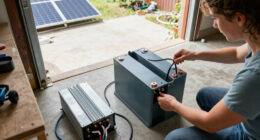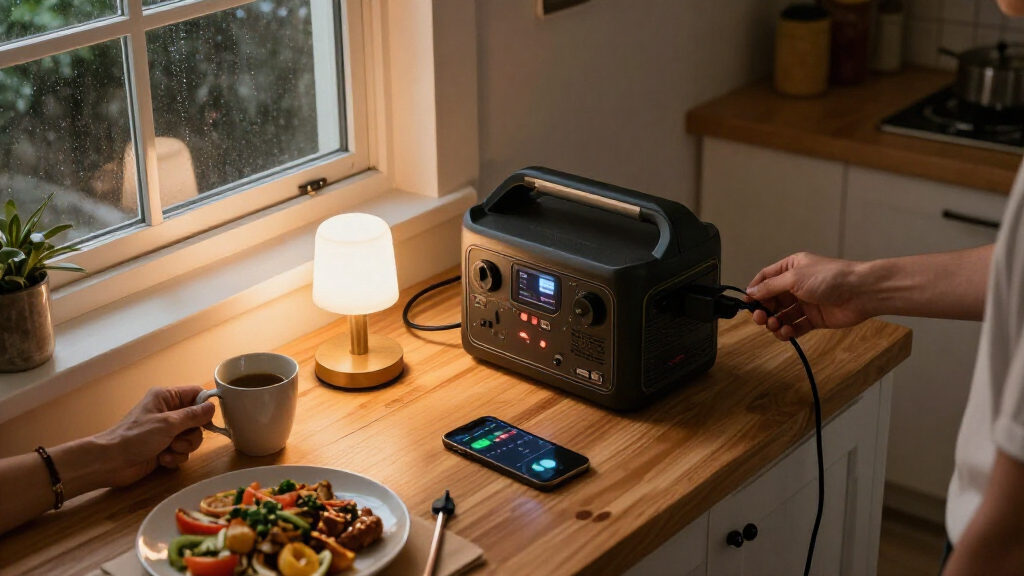
A portable power station serves as a silent, gas-free alternative to traditional generators for short-term home outages. This guide walks you through selecting the right capacity, preparing the unit for immediate use, and safely connecting essential appliances. You will learn how to calculate your power needs to avoid overloading the battery and how to maintain the unit so it remains ready when the grid fails. This process is suitable for homeowners seeking a reliable emergency power source without the complexity of installing a permanent transfer switch or generator. By the end of this guide, you will have a fully charged, tested system capable of keeping your lights, internet, and refrigeration running for several hours.

Get backup power and energy gear delivered free with Prime
- Fast, free delivery on millions of items
- Prime Video, Amazon Music and more included
- Member-only deals all year
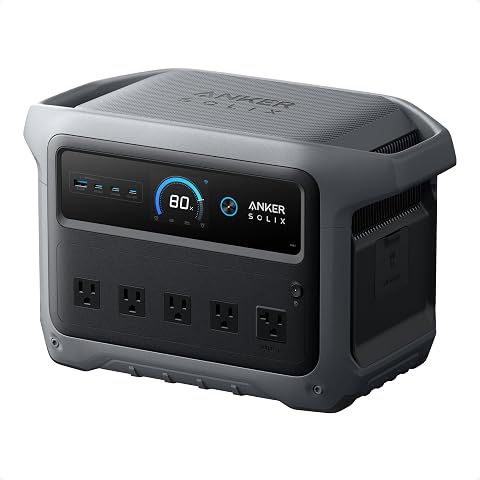
Anker SOLIX C1000 Gen 2 Portable Power Station
- ✔ Battery capacity: 1,024Wh
- ✔ Battery type: LiFePO4
- ✔ Output: 2,000W; 3,000W peak

BLUETTI Elite 30 V2 Portable Power Station, 288Wh, 600W
- ✔ Battery capacity: 288Wh
- ✔ Battery type: LFP
- ✔ Continuous output: 600W

Jackery Explorer 300 Portable Power Station, 292Wh
- ✔ Capacity: 292Wh
- ✔ Battery chemistry: LiFePO4
- ✔ Rated output: 300W
Difficulty: Beginner | Time: 1-2 hours for setup; ongoing maintenance varies
What You’ll Need
Tools & Materials:
- Portable power station (LiFePO4 recommended for longevity)
- AC charging cable and/or DC solar panel
- Extension cords rated for high amperage
- Power strip with surge protection
- Device power list (wattage ratings of essential items)
Knowledge:
- Basic understanding of Watts, Volts, and Amps
- Awareness of which household items require high startup power
- Understanding of your home’s circuit breaker panel location
Safety Warning: Never connect a portable power station to your home’s electrical panel without a certified transfer switch. Doing so can backfeed electricity, endangering utility workers and damaging your unit. This guide focuses on direct plug-in usage for individual devices and small groups.
Anker SOLIX C1000 Gen 2 Portable Power Station
The Anker SOLIX C1000 Gen 2 is the clearest fit for shoppers who want more than emergency phone charging. Its 1,024Wh capacity and 2,000W output give it substantially more energy and appliance headroom than the Jackery Explorer 300 or BLUETTI Elite 30 V2. That wider operating range can support a more useful mix of household essentials, although we still need to check each device’s running and startup wattage against the station’s limits.Fast recharging is another practical advantage when outages are intermittent: the supplied specifications state a 49-minute AC recharge at 1,600W and solar input up to 600W, with a stated solar recharge time of 1.8 hours. Those are conditional figures, not guaranteed results in every home or weather condition. The under-10ms UPS switchover may also help keep compatible critical electronics powered through a brief interruption, but we should confirm that the specific device can use this backup mode as intended.The compromise is that this is the largest and heaviest option in the lineup at 11.3kg. It is still portable, but not as effortless to lift or stow as either small station. The listing also gives inconsistent counts—nine outlets in the specifications versus power for up to 10 devices in the description—so we should check the actual connection needs rather than rely on the device-count claim. Compared with the BLUETTI and Jackery, this is the better choice for meaningful outage coverage; skip it if compactness matters more than capacity or if the goal is whole-home backup.
Pros:
- 1,024Wh capacity offers far more stored energy than the two compact alternatives.
- 2,000W output and 3,000W peak output provide the broadest appliance capability in this comparison.
- Supports AC and solar recharging, with fast recharge specifications.
- Under-10ms UPS switchover and a stated 4,000-cycle life support backup-oriented use.
Cons:
- At 11.3kg, it is noticeably heavier than the Jackery and BLUETTI.
- The listing’s outlet and device counts do not agree.
- A portable station still cannot be assumed to run every household appliance or power an entire home.
Best for: Households that want a portable station for several essential devices and need more output and energy than a 300Wh-class unit provides.
Not ideal for: Buyers seeking an ultralight station, whole-home backup, or a guaranteed runtime for a specific appliance without calculating its energy use.
Bottom line: We recommend the Anker as the most capable home-backup choice here when capacity and output matter more than carrying weight.
“We recommend the Anker as the most capable home-backup choice here when capacity and output matter more than carrying weight.”
BLUETTI Elite 30 V2 Portable Power Station, 288Wh, 600W
The BLUETTI Elite 30 V2 occupies a useful middle ground among small stations. Its 288Wh capacity is nearly the same as the Jackery Explorer 300, but its 600W continuous output is twice the Jackery’s stated 300W rated output. That makes BLUETTI the more flexible pick when a household device draws more power, while the similar battery size still limits how long either unit can keep loads running.Its most home-specific advantage is the stated UPS switchover of 10ms or less. This can suit compatible electronics that benefit from a quick transfer during an outage, such as a modem or small computer setup. The station also supports adjustable AC charging and lists a 0–80% charge time of 45 minutes, plus solar, car, lead-acid, and generator input options. These multiple charging routes offer more flexibility than the Jackery’s stated compatible-panel solar approach, although fast charging depends on available input and settings.We rank it second because it adds output and a clear backup feature without matching the Anker’s much larger energy reserve. The stated 1,500W Power Lifting Mode should not be mistaken for 1,500W continuous output; the continuous figure is 600W. And although nine total outlets are listed, the 288Wh battery remains a constraint for long outages or energy-hungry appliances. Choose it over Jackery when output headroom and UPS behavior matter; choose Anker when duration and larger loads are the priority.
Pros:
- 600W continuous output gives it more load headroom than the Jackery Explorer 300.
- UPS switchover is specified at 10ms or less.
- Supports AC, solar, car, lead-acid, and generator charging.
- Adjustable AC charging and a stated 0–80% time of 45 minutes can shorten recharge downtime.
Cons:
- The 288Wh battery is small for extended outages or larger household loads.
- Power Lifting Mode’s 1,500W figure is not the continuous output rating.
- Individual appliance runtimes are not specified.
Best for: Buyers who need a compact station for modest essential loads and value stated UPS switching, higher continuous output, and several charging methods.
Not ideal for: Households looking for extended outage runtime, higher-capacity appliance backup, or a substitute for a whole-home system.
Bottom line: We’d choose the BLUETTI over the Jackery for its higher continuous output and UPS feature, while accepting that capacity remains limited.
“We’d choose the BLUETTI over the Jackery for its higher continuous output and UPS feature, while accepting that capacity remains limited.”
Jackery Explorer 300 Portable Power Station, 292Wh
For buyers who prioritize easy handling, the Jackery Explorer 300 is the most portable station in this group at 7.1 pounds. Its 292Wh capacity is close to the BLUETTI’s 288Wh, and its mix of AC, USB-C, USB-A, and car outputs can keep several small devices connected. That makes it a plausible short-outage companion for phones, lights, or other modest loads, provided their combined draw stays within the station’s limits.Portability comes with a firm ceiling: the 300W rated output is half the BLUETTI’s continuous rating and far below the Anker’s 2,000W. We would not choose this model for appliances whose draw exceeds that rating, and the small battery means device runtime must be estimated from actual wattage rather than assumed. Its LiFePO4 chemistry is specified for over 4,000 cycles before reaching 70% capacity, a useful longevity detail for a unit that may be topped up between emergencies.Solar charging is supported with compatible Jackery panels, but the panel is sold separately, so a solar-ready setup requires an additional purchase. The supplied information does not identify a UPS transfer feature, unlike the BLUETTI and Anker. We therefore rank Jackery third for home-backup capability, even though it wins on carry weight: it is best for a small set of low-power essentials, not for buyers who expect broader household coverage.
Pros:
- Lightest option in this comparison at 7.1 pounds.
- Multiple AC, USB, and car ports support several small devices.
- LiFePO4 battery is specified for over 4,000 cycles before reaching 70% capacity.
- Compatible solar charging is available for buyers willing to source a panel separately.
Cons:
- 300W rated output limits the appliances it can support.
- Solar panel is not included.
- No UPS backup feature is specified in the supplied product information.
Best for: People who want a lightweight, easy-to-store station for phones and other low-power devices during short interruptions.
Not ideal for: Buyers who need UPS switching, higher-wattage appliance support, or enough stored energy for longer outages.
Bottom line: We’d pick the Jackery when low weight and small-device backup matter more than appliance capacity or UPS functionality.
“We’d pick the Jackery when low weight and small-device backup matter more than appliance capacity or UPS functionality.”
As an Amazon Associate we earn from qualifying purchases.
Before You Start
Before purchasing or unboxing your new unit, determine exactly what you need to power. A common mistake is buying a unit too small for a refrigerator or too large for just charging phones. List every device you plan to run during an outage. Check the label on each device for its “Running Watts” and “Starting Watts.” For example, a modern refrigerator might run at 150 watts but require 1,200 watts to start. Your power station must handle the highest starting wattage of any single device you plug in, not just the total running watts. Gather this data in a notebook or spreadsheet before proceeding to the setup steps.
Step-by-Step Instructions
Step 1: Calculate Your Total Power Load
Sum the running watts of all devices you intend to use simultaneously. Add a 20% buffer to this total to account for inefficiencies and power surges. Compare this number to the rated output and surge output of your chosen power station. If your total load exceeds 80% of the unit’s rated output, reduce the number of devices or choose a larger model. For example, if your total load is 1,500 watts, select a unit rated for at least 1,800 watts continuous output.
Tip: Refrigerators and freezers are the most common cause of overload. Always verify their starting wattage specifically.
Check: You have a written list of devices with their wattage ratings, and the total is comfortably below your power station’s maximum rated output.
Step 2: Fully Charge the Unit Before First Use
Connect the portable power station to a wall outlet using the provided AC charging cable. Turn the unit on if required by the manufacturer. Monitor the battery percentage via the built-in display until it reaches 100%. Unplug the unit only after the full charge cycle is complete to calibrate the battery management system.
Tip: If using a solar panel for charging, ensure the panel’s voltage matches the input requirements of the station to avoid damage.
Check: The display shows 100% battery capacity, and the charging icon disappears.
Step 3: Connect Essential Devices Correctly
Plug high-draw appliances, such as space heaters or microwaves, directly into the AC outlets on the power station body using their native power cords. Connect low-draw electronics like laptops, routers, and lamps to a surge-protected power strip, then plug that strip into one of the station’s AC outlets. Ensure you do not daisy-chain multiple power strips together.
Tip: Keep cables short and away from high-traffic areas to prevent tripping hazards or accidental disconnection.
Check: All connected devices receive power, and the power station display shows the current wattage draw is within safe limits.
Step 4: Test the System Under Load
Run all essential devices simultaneously for at least 30 minutes while observing the power station. Watch for any error messages, overheating warnings, or automatic shutdowns. If the unit shuts off, immediately unplug the most power-hungry device and restart the unit to identify the cause of the overload.
Tip: Touch the casing of the power station gently to check for excessive heat. Warm is normal; hot to the touch indicates a problem.
Check: All devices remain powered, and the unit operates without error codes or excessive heat generation.
Step 5: Store and Maintain the Unit
Discharge the battery to approximately 50-60% before placing the unit in long-term storage. Store the unit in a cool, dry place away from direct sunlight and extreme temperatures. Set a calendar reminder to recharge the unit to 100% and then discharge it back to 50% every three to six months to preserve battery health.
Tip: Label the storage location with a reminder date for the next maintenance cycle.
Check: The unit is stored at room temperature, disconnected from all cables, and has a maintenance calendar reminder set.
Common Mistakes to Avoid
- Overloading the unit by ignoring starting watts. — Always check the “starting watts” or “surge watts” for motors and compressors, not just the running watts. A device might run at 200 watts but need 1,000 watts to start.
- Using cheap, thin extension cords. — Use heavy-gauge extension cords (12-gauge or thicker) for high-wattage devices to prevent voltage drop and fire hazards. Thin cords can overheat and melt under heavy load.
- Storing the battery at 0% or 100% for months. — Lithium batteries degrade if stored fully empty or fully full for extended periods. Keep the battery between 40% and 60% during long-term storage.
Troubleshooting
Problem: The power station shuts off immediately when plugging in a device.
Solution: The device likely exceeds the unit’s surge capacity. Check the device’s starting wattage. If it is within limits, try resetting the power station’s AC output button or rebooting the unit. If the problem persists, the device may have a faulty component drawing excessive current.
Problem: The unit is not charging from a wall outlet.
Solution: Verify the wall outlet is working by plugging in another device. Check the charging cable for damage or loose connections. Ensure the power station is turned on. If using a multi-port USB charger, confirm it supports the required voltage and amperage for the station’s input.
Problem: The battery drains faster than expected.
Solution: Check for phantom loads. Devices left plugged in but turned off may still draw power. Unplug devices when not in use. Also, verify the ambient temperature; cold weather significantly reduces battery capacity and discharge efficiency.
What Success Looks Like
You have successfully calculated a safe power load, charged the unit to full capacity, tested it with your essential devices for 30 minutes without failure, and stored it at the optimal charge level for long-term readiness. The unit is accessible, cables are organized, and you have a clear understanding of which devices can run simultaneously.
Next Steps
After the initial setup, create a printed “Power Outage Plan” listing your essential devices and their wattage. Keep this document near the power station. Check your local weather forecast during storm seasons and top off the battery charge if a potential outage is predicted. If you find yourself regularly running out of power, consider purchasing a second unit or upgrading to a larger capacity model. For whole-home backup, consult a licensed electrician about installing a permanent transfer switch and a larger battery system.
Frequently Asked Questions
Can I run a standard household refrigerator on a portable power station?
Yes, but you must choose a unit with sufficient surge capacity. Most portable stations rated at 1,000 watts or higher can handle modern refrigerators. Older or larger fridges may require 2,000+ watt surge capacity. Always check the label on your specific fridge.
How long will a portable power station last during an outage?
Runtime depends on the total wattage of connected devices. A 1,000Wh unit running a 100-watt load will last approximately 10 hours (accounting for efficiency losses). A 1,500-watt load will drain the same unit in less than 45 minutes. Calculate runtime by dividing the battery capacity (Wh) by the total load (W), then multiplying by 0.85 for efficiency.
Is it safe to leave a portable power station plugged in all the time?
Most modern units have battery management systems that prevent overcharging. However, leaving a lithium-ion battery at 100% for months can degrade its lifespan. For optimal longevity, use the unit regularly or cycle it every few months if stored.
Can I charge the power station with a car cigarette lighter?
Yes, if the station supports 12V DC input and the car’s alternator is running. This is a slow charging method, suitable for emergency top-ups while driving, but it will not recharge a depleted unit quickly. Always use a dedicated 12V adapter provided by the manufacturer.