TL;DR

Get backup power and energy gear delivered free with Prime
- Fast, free delivery on millions of items
- Prime Video, Amazon Music and more included
- Member-only deals all year
Portable power stations for home backup are rechargeable battery systems that can run selected household devices, such as phones, lights, routers, and sometimes a refrigerator. Choose one by checking both capacity in watt-hours and output in watts, then match those figures to your appliances, desired runtime, and recharge plan. Most units power devices plugged directly into them; connecting one to home wiring requires compatible, properly installed equipment.
A refrigerator can spoil food in a long outage even while your phone still shows 80% battery. That mismatch is why choosing portable power stations for home backup takes more than shopping for the biggest number on a box.
These rechargeable battery systems can run selected household devices without engine exhaust at the point of use. They are useful for essentials, but their stored energy is limited, and a portable unit is not automatically a whole-home power system.
This guide shows you how to match capacity, output, and runtime to the devices you actually need, compare charging and battery details, and avoid unsafe wiring shortcuts. You’ll finish with a practical checklist you can use before buying.
Check both watt-hour capacity for estimated runtime and watt output for the devices you can run at once.
Include motor or compressor surge needs when evaluating refrigerators and other starting loads.
Match the battery, outlets, charging options, and weight to a written list of backup priorities.
Use direct plug-in connections unless a compatible home integration system has been installed appropriately by a licensed electrician.
Follow the manufacturer’s safety and storage instructions, and test your intended devices before an outage.
Know what a portable power station can—and can’t—run
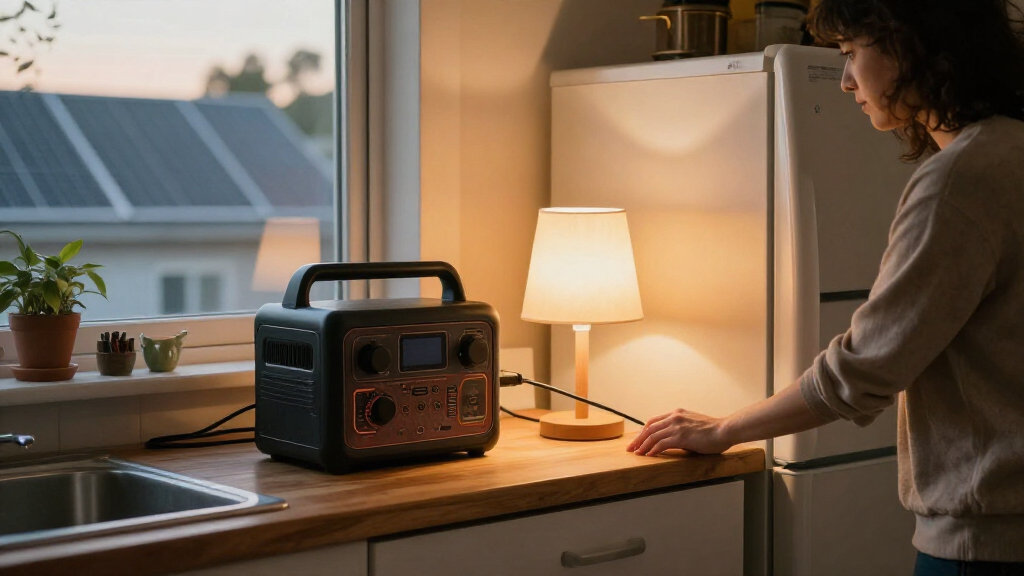
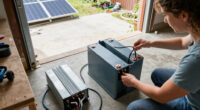
Portable power stations for home backup store electricity in a rechargeable battery and deliver it through built-in outlets and ports, so you can power selected devices during an outage. They work well for essentials you can plug directly into the unit, but they do not automatically energize your home’s outlets or every appliance.
Think of one as a stocked water tank, not a new water main: the capacity is how much energy you have stored, while the outlets deliver that energy at a limited rate. A station might run a phone, Wi-Fi router, and LED lamp for hours, yet struggle with a high-draw kettle or space heater. The exact result depends on the device and station specifications.
For example, imagine a storm knocks out power on a cold evening. You could plug in a router, a couple of lamps, and phones; you probably shouldn’t assume the same unit will heat a room all night. Heating appliances use lots of energy, so they can drain a modest battery quickly.
Think backup for essentials, not a whole-house replacement. A battery station’s outlet panel is useful; it is not permission to connect the unit to home wiring any way you like.
Battery units are quiet at the point of use and do not produce engine exhaust while operating, unlike fuel-burning generators. That does not make every use risk-free: follow the manufacturer’s guidance for charging, ventilation, temperature, storage, and damage. If you also own a fuel generator, keep its outdoor-use and carbon-monoxide precautions separate from the battery station’s instructions.
Products Worth Considering

Ring Alarm Pro 14-Piece Home Security Kit with Built-In eero Wi-Fi 6 Router

Bose SoundLink Plus Portable Bluetooth Speaker, Wireless Outdoor Speaker, Up to 20 Hours Battery Life, Waterproof and Dustproof, Black

Dreame H12 Pro Wet and Dry Vacuum Mop
As an affiliate, we earn on qualifying purchases.
Match capacity and output to the appliances you need
Choose a station by checking capacity in watt-hours (Wh) and output in watts (W): capacity helps estimate runtime, while output limits how much power the unit supplies at once. You need both numbers, because a large battery may still be unable to start an appliance with a high power draw or motor surge.
Start with the devices you plan to use together. Add their running wattage to check simultaneous demand, then check each motor-driven appliance’s surge requirement against the station’s surge rating. A refrigerator compressor, for example, can need a short burst of power when it starts; its running-watts figure alone may not tell the whole story.
A rough runtime estimate is usable battery capacity × device efficiency ÷ device power use. In practice, inverter losses, temperature, battery condition, and changing power draw affect the result. For a simple illustration, a 500 Wh usable battery running a steady 50 W load would provide about 10 hours before losses; actual runtime would be shorter.
- List your essentials: Note the router, lights, phones, laptop, medical equipment, or refrigerator you want to run.
- Check their power needs: Use labels or manuals, and include surge ratings for motors and compressors.
- Choose a runtime: Decide how long each device must work before you can recharge.
- Compare the station: Confirm its continuous output, surge output, usable capacity, and compatible outlets.
Say your priority is keeping a router and two lights going overnight, not running every kitchen appliance. That list may point you toward a smaller, easier-to-carry unit than a broad “whole-home backup” claim would. For a refrigerator, look up its label or manual and plan for compressor cycling, warm weather, and frequent door openings.
Compare battery life, charging, and connections before you buy
Battery chemistry, recharge options, and outlet types shape how useful a station will be after the first stretch of an outage. Compare the exact model’s warranty, cycle-life terms, charging limits, and connections rather than assuming two units with the same capacity will perform the same way.
Many current stations use lithium-ion batteries, including lithium iron phosphate (LFP or LiFePO₄) and other lithium chemistries. Manufacturers often emphasize LFP’s cycle life and thermal stability, while other chemistries can allow a smaller or lighter unit for a given capacity. Check how many cycles the maker specifies and what remaining capacity defines the end of that claim; cycle counts do not translate neatly into guaranteed years.
Charging can come from a wall outlet, a car connection, or compatible solar panels. Some models combine sources, but limits vary. Read the solar input voltage and current limits, confirm the connector matches, and check whether panels are included or sold separately. A sunny afternoon might help refill the battery, but shade, clouds, panel angle, and available space can slow charging dramatically.
Also compare continuous and surge output, AC outlets, USB ports, DC connections, and voltage. In the United States, many household appliances use 120 V AC; requirements differ elsewhere. A pure sine-wave inverter is commonly preferred for a broad range of electronics and appliances, but you should still check device manuals—especially for medical equipment, pumps, and other critical loads.
For instance, a household with a laptop, router, and phone may value several USB ports, while someone hoping to keep a refrigerator running should focus on AC output and surge capacity. Faster wall charging can help between outages, but the actual time depends on battery size, input limits, temperature, and settings. Weigh that convenience against the unit’s cost, weight, fan noise, warranty, and any expansion-battery or solar-panel expenses.
Use home integration and safety rules to protect your household
A portable station with ordinary outlets usually powers devices plugged directly into it; connecting it to household wiring requires equipment designed for that purpose and installed correctly. Never feed power into a home circuit through a wall outlet, a practice called backfeeding. It can expose utility workers or household members to dangerous electrical current and create a fire risk.
Some systems support selected home circuits through compatible transfer equipment, but the advertised output of a station does not prove that it can be connected safely or legally. Before planning that setup, ask a licensed electrician about the right equipment, installation, and any local permit or code requirements. Electrical work is not a place to improvise or skip safety steps.
For a straightforward example, you could keep a router and a lamp running by plugging them directly into the station. If you want a refrigerator circuit to receive backup through your home panel, don’t make a homemade cable or switch arrangement; get professional advice on an approved system. Follow the manual, keep the unit away from water and excessive heat, and stop using a battery that looks swollen or damaged.
Medical devices need special planning. Ask the equipment provider whether the specific station is suitable, check the device’s power needs and backup runtime, and keep a second plan for a prolonged outage. A portable power station should not be assumed to replace a medical-grade backup system.
Before an outage, keep the battery charged according to the maker’s storage instructions and test it with the devices you intend to use. A quick test on a calm weekend can reveal a missing cable or a louder-than-expected cooling fan before a storm turns the living room dark. If you also own a fuel generator, never bring it indoors; it has different hazards and must follow its own safety requirements.
Choose the right size with a simple backup plan
The right station is the one that covers your priority devices for the time you need, can supply their starting and running power, and fits your budget and storage space. Bigger capacity often adds cost and weight, so a precise backup plan can be more useful than buying the largest unit you can afford.
Picture a household that wants overnight internet, a few lights, phone charging, and occasional laptop use. Its list is different from a household that wants to keep a refrigerator running or operate a critical pump. Those choices affect both the battery capacity and the output rating, and they may change whether a portable unit alone is enough.
Use this checklist when comparing models:
- Power at once: Add the wattage of devices you may run together.
- Starting surge: Check motor and compressor requirements.
- Backup duration: Estimate hours for each priority device and account for losses.
- Charging plan: Compare wall, car, and solar recharge time and input limits.
- Fit and support: Check weight, dimensions, handles, fan noise, warranty, and accessory costs.
- Safe connection: Confirm whether any home-circuit integration uses compatible, professionally installed equipment.
Market features keep changing: newer models may offer more LFP batteries, expandable capacity, faster AC charging, higher solar input, or phone apps for monitoring. These are category trends, not guarantees that every newer model is better. Verify the exact version’s specifications, independent test results where available, and warranty terms.
Cost matters beyond the unit itself. A station may need optional solar panels, an expansion battery, or cables, and a heavy model can be awkward to move when you’re alone. Think through where you’ll store it, how you’ll recharge it, and who will carry it; a backup plan should work in your actual home, not just on a product page.
Frequently Asked Questions
Can a portable power station run a refrigerator?
Often, if its continuous output and surge rating meet the refrigerator’s needs. Runtime depends on usable capacity, compressor cycling, room temperature, and how often you open the door, so check the refrigerator’s label or manual instead of relying on a generic estimate.
Can a portable power station power my whole house?
Usually, not through ordinary outlets. Some models can support selected circuits with compatible transfer equipment, but home wiring needs an approved setup and professional installation. Never backfeed a circuit through a wall outlet.
How long will a power station run my devices?
There is no single runtime for a station. A useful starting estimate is usable watt-hours divided by average device watts, then adjust for conversion losses and real-world conditions such as temperature and variable loads.
Can I recharge a power station with solar panels?
Many models accept solar charging, but panel compatibility is not universal. Check the station’s solar input limits and connector; sunlight, shade, weather, and panel placement all affect recharge time.
Is a portable power station safe to use indoors?
Battery stations do not produce engine exhaust during operation, unlike fuel-powered generators. Follow the model’s instructions for use and charging, keep it away from water and excessive heat, and stop using it if the battery is damaged or swollen.
Conclusion
Buy for a specific backup plan: name the devices, estimate their run time, and check both the station’s capacity and output before you spend. Then confirm charging options, safe connections, warranty terms, and whether you can lift and store the unit.
A well-matched station won’t make every outage disappear. It can keep the router’s little lights blinking, the phones charged, and the room from going pitch-black—one carefully chosen essential at a time.