TL;DR

Get backup power and energy gear delivered free — and shop member deals
- Fast, free delivery on millions of items
- Access to Prime Big Deal Days deals on October 6–7
- Prime Video, Amazon Music and more included
A solar backup power station stores electricity in a rechargeable battery and supplies it through an inverter and device ports. Choose by checking both capacity in watt-hours and output in watts, then account for real-world runtime, solar conditions, compatibility, and whether the unit has a true UPS mode.
Capacity in Wh measures stored energy; output in W measures how much power the station can supply at once.
Estimate energy as device watts × hours, then allow for conversion losses and check motor startup surges.
Solar panel wattage is a rated maximum; shade, weather, orientation, compatibility, and the station’s input limit affect charging.
Check the transfer-time specification if you need UPS protection for sensitive electronics.
Use a qualified, licensed electrician and properly designed transfer equipment to connect backup power to household wiring.
What a solar backup power station can actually do
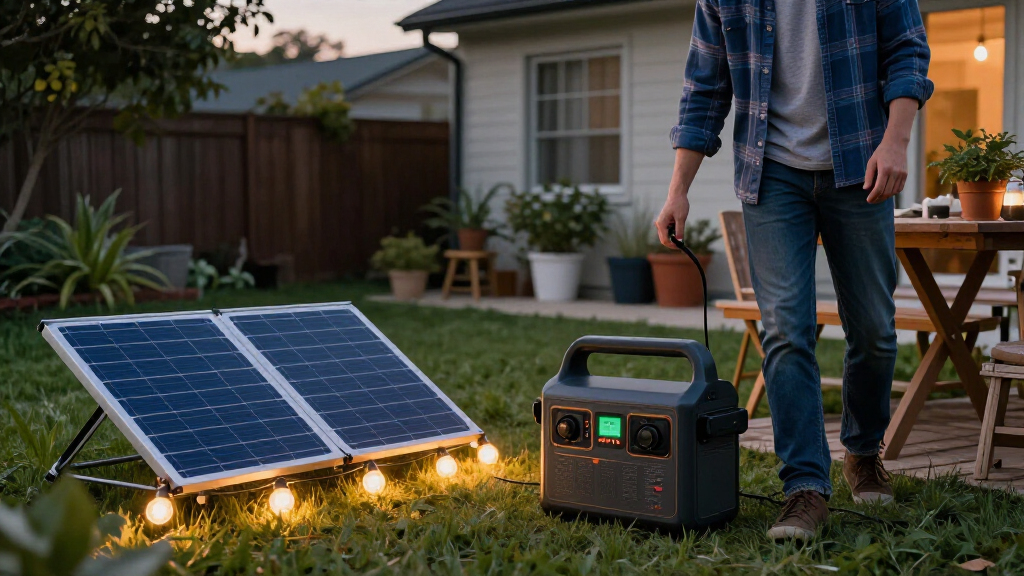
A solar backup power station is a rechargeable battery paired with an inverter and ports for powering or charging devices. It stores electricity instead of making it on demand like a fuel generator, and it can recharge from wall outlets, a vehicle, or compatible solar panels [1]. Because it stores a finite amount, it is best understood as a supply you manage: every device drawing power reduces the energy available for the next hour or the next appliance. Think of it like a water tank with a tap: the battery’s watt-hours (Wh) describe the tank’s stored energy, while its watts (W) describe how quickly it can deliver energy. You need enough of both. A station with 1,000 Wh of capacity may store plenty for a small appliance, yet its output limit could still be too low to start that appliance’s motor. Conversely, a high-output station can handle a demanding device but may run out quickly if its battery is small. These ratings answer separate buying questions: what can it power at once, and for how long? For example, a router drawing 15 W is a modest load; a kettle rated at 1,500 W demands far more power at once. Check the station’s continuous output and surge rating against the device label or manual before plugging it in. The number on the appliance matters as much as the battery size. A motor or compressor may briefly need more power when starting than it uses while running, so a station that appears adequate from the running wattage alone may shut off at startup.How to size a station for the devices you use
To size a solar backup power station, list the devices you need, estimate their average wattage and runtime, then check both total energy and peak output. A fridge, router, and phone have very different loads, so a short list beats guessing from the station’s headline capacity. This process makes the tradeoff visible: prioritizing a few essential devices can stretch a modest battery, while trying to run everything at once may require a much larger and heavier unit.- Write down each device and its wattage, using an energy monitor or manufacturer specifications when available. For appliances that cycle, average use over time is more useful for runtime than a single peak reading.
- Multiply watts by hours to estimate energy use. A 10 W router running for 12 hours uses about 120 Wh.
- Add the loads together, then leave a margin for inverter losses, battery limits, and the station’s own consumption. The margin matters because the advertised capacity is not necessarily all available to your devices.
- Check continuous and surge output against the devices you’ll run together, including startup demand from motors or compressors. If several devices start at once, their combined peak demand can exceed the station’s rating even when their average draw seems manageable.
Why your actual runtime will be shorter than the math
Runtime is roughly usable battery energy divided by device power, but that calculation gives you a starting estimate, not a promise. Inverter losses, battery limits, and the station’s own power use shorten the result, and appliances rarely draw a perfectly steady load [1]. That distinction matters during a long outage: a plan based on rated capacity can leave less reserve than expected, especially if you need power overnight or cannot recharge the next day. A refrigerator shows why averages matter. Its compressor cycles on and off, so its average use over several hours can be lower than its running wattage; when the compressor starts, however, its power demand can briefly jump. Use an energy monitor to learn the fridge’s real consumption, and check the power station’s surge rating before you count on it. Average energy use helps predict how many hours the battery may last; surge capability determines whether the fridge can start at all. You need both figures for a useful estimate. For a simpler load, estimate and then allow a cushion. If a 100 W device runs for five hours, the arithmetic gives 500 Wh; a station will need more than 500 Wh of rated capacity to cover losses and operating limits. Cold weather, battery age, and your chosen reserve can also affect the energy available. Keeping a reserve is a practical tradeoff: it reduces the time you can use devices now, but leaves energy for an unexpected need or for periods when charging is unavailable.How solar panels recharge a station—and why timing varies
Solar charging time depends on the station’s battery capacity, effective panel output, sunlight, and input limit. A panel’s rated wattage is its maximum under test conditions, so a 200 W panel does not deliver 200 W throughout an ordinary day [1]. Solar is therefore a way to replenish finite stored energy when conditions allow, not a guaranteed replacement for grid charging. The bigger the battery and the less predictable the sunlight, the more important it is to plan around charging windows and conserve power between them.| Charging source | What it’s useful for | What to check |
|---|---|---|
| Wall outlet | Fast, predictable charging before an outage | Charge rate and available outlet time |
| Vehicle outlet | Recharging while driving or between campsites | Vehicle output and station charging compatibility |
| Solar panels | Recharging away from the grid or during a long outage | Sun, panel voltage, connector, and solar-input limit |
When a station works as outage backup—and when it doesn’t
A solar backup power station can run selected devices during an outage, but the word “backup” does not always mean automatic, uninterrupted power. Some units need you to switch them on or move plugs after the grid fails; pass-through charging is also different from a dedicated uninterruptible-power-supply (UPS) mode [1]. The distinction affects what you can rely on: a station that requires a person to reconnect equipment may be useful for lights and chargers, but it cannot protect a device that must stay powered while nobody is there. If a desktop computer, network storage device, or other sensitive equipment must stay on, look up the manufacturer’s transfer-time specification. A UPS mode switches power quickly enough for supported loads; a station that merely passes power through may not. For example, your Wi-Fi router might tolerate a brief interruption, while a computer in the middle of saving a file may not. Check compatibility and test the actual device, since a short transfer interruption can matter even when the station has enough capacity and output for hours of operation. A portable station also does not connect to household wiring like a home electrical panel. Running circuits in a house requires compatible transfer equipment and installation by a qualified, licensed electrician, following local electrical rules. That equipment isolates the home from the grid and routes power to selected circuits; a portable outlet alone does not safely do that job. For a simple outage kit, plug selected devices directly into the station and keep cooling vents clear, as the manufacturer directs.Which battery and setup details matter after the first charge
Battery chemistry, weight, charging options, and service support all shape how useful a station feels after you bring it home. Many newer mid-sized and larger models use lithium iron phosphate (LFP), valued for thermal stability and long cycle life; other lithium-ion chemistries can pack more energy into a lighter unit [1]. The tradeoff is practical: a lighter model may be easier to carry, while a heavier one may offer longer service life or more capacity. Neither label alone tells you which will suit your routine, because charge habits, operating conditions, and warranty terms also matter. Published cycle-life figures depend on operating conditions and each maker’s definition of end-of-life, so compare the fine print rather than treating one number as a guarantee. A 2026 buyer might also find faster wall charging, higher solar-input limits, modular expansion batteries, app monitoring, or UPS features, but product availability and specifications change. Confirm the current manual and warranty before buying. Faster charging can be valuable when grid power is available only briefly; a higher solar-input limit is useful only if your panels and sunlight can actually provide that input. Picture carrying the station from a closet to a campsite: a larger battery may power more devices, but it can also be heavy, take longer to charge, and need more panel area. Check the combined weight of the unit and panels, fan noise, storage temperature guidance, warranty, repair options, and whether the station can recharge while powering devices. These details affect whether you will keep it charged, move it where needed, and maintain it over time. A phone charger needs little; a refrigerator backup takes more planning.How a battery station compares with a fuel generator
A battery station offers quiet power at the point of use and produces no exhaust during normal operation, while a fuel generator can keep running as long as you have fuel. The right choice depends on the load, outage length, noise tolerance, and where you can operate equipment safely [1]. A battery’s convenience comes with a finite energy supply and a need to recharge; a generator’s longer runtime comes with fuel storage, noise, and exhaust management. Comparing those operating realities helps clarify which one fits your likely outage rather than just the headline power rating.| Feature | Battery station | Fuel generator |
|---|---|---|
| At the point of use | Quiet; no exhaust during normal use | Noisy; produces exhaust |
| Energy supply | Finite stored energy; recharge from outlets, vehicle, or compatible panels | Can run longer with fuel |
| Best fit | Selected electronics and modest loads | Longer power needs when fuel and outdoor operation are available |
| Operating care | Follow battery, ventilation, and cable guidance | Operate outdoors, away from openings, because of exhaust |
A short checklist before you rely on backup power
Before an outage, test your setup with the actual devices you plan to use and confirm how the station behaves. A 15-minute check on a calm afternoon can expose a mismatched cable, weak charging setup, or missing UPS feature before a storm darkens the room. Testing also turns the label ratings into practical information: you can see which devices run together, how quickly the battery percentage falls, and whether the controls are easy to use under pressure.- Test your priority loads: plug them in and confirm the station can run them together. Try motorized devices through a start cycle and note the battery use over a realistic interval.
- Verify solar compatibility: confirm panel voltage, connector, and maximum input in the manual. If possible, check charging in the location and orientation you expect to use.
- Learn the controls: check how to enable outputs, read remaining capacity, and set charging limits. Knowing what the display measures helps you judge whether the plan is lasting as expected.
- Store and ventilate it correctly: follow the maker’s storage guidance, keep vents open, and inspect cables for damage. A charged battery that has been stored outside its recommended conditions may not be ready when needed.
Frequently Asked Questions
How big a power station do I need for a refrigerator?
Check the refrigerator’s average energy use and its compressor’s startup demand. Compare that demand with the station’s continuous and surge output, then estimate runtime from usable watt-hours with room for conversion losses. An energy monitor can give you a more realistic figure than the fridge’s peak rating alone.Can a solar backup power station run a house?
It can power selected devices that fit within its output and capacity. Whole-home backup usually needs a larger system and compatible transfer equipment installed to local electrical rules by a qualified, licensed electrician. A portable station does not connect directly to household wiring.How long do solar panels take to recharge a power station?
A rough estimate is battery capacity divided by effective panel output. For instance, 1,000 Wh divided by 200 W gives five hours under ideal full-power conditions; shade, clouds, panel angle, temperature, and the station’s input limit can make charging take longer.Can I use any solar panel with my power station?
No. Check the station’s allowed panel voltage and current, connector type, and maximum solar input before connecting a panel. A panel that is incompatible can fail to charge the station or exceed its specified input limits.Can I leave a power station plugged in all the time?
Follow the maker’s instructions for standby use, charging limits, and long-term storage. Storage guidance often calls for keeping the battery partly charged and checking it periodically; recommendations vary by model and battery chemistry.Conclusion
Choose a station by matching its output to the devices you’ll run and its usable capacity to the hours you need them. Then test the whole setup before an outage; when the lights go out, you’ll want a quiet hum and a working router, not a box of unanswered questions.Fall Picks
fall essentials
As an affiliate, we earn on qualifying purchases.